Friday, 25 October 2013

Creative Media Practise - Final Project

 To present my final presenation I used prezi, below is a screen shot of my final presentation. I began talking about the planning of my project, then moved onto the final piece and all the problems I had and finally the evaluation.


Here is a link to my presentation I made using prezi...


And here it is my final project...


Thursday, 24 October 2013

Creative Media Practise - Proposal

For my final project I am considering a interactive YouTube video. I have researched through many different interactive videos and this particular one interested me the most...
The video gave me the idea to do something similar, the video will first explain what the video is about and what you have to do. The video will begin with a hand and a pencil drawing a line, the first set of options will be to either next draw a man, woman or dog. Each option will then lead the user through different activities that the character has to get past to get to the top of the what they want. The first options will be 1) Door 2) Stairs 3) Escalator and the options will then continue as followed...
- 1) Car 2) Bus 3) Bike
- 1) Train 2) Airplane 3) Ferry
- 1) House 2) Hotel 3) Villa
- 1) Person 2) Cat 3) Swing


Here is an example in a story board...


Creative Media Practise - Isadora

In our 2nd lecture we were introduced to Isadora, this is a software that creates different interactions on a video for the user. We looked at many examples during the lecture.
We were then put into groups of 4, in this group we began with no clue on what to do for this project. So we did some research, listened to other peoples ideas and then came up with the idea to have a female miss her train and have to choose many options whilst trying to make her way home. The woman began with 2 different options of whom she wanted to call either her mother or friend, then many options followed depending on which option the user chose. Whilst planning we watched many Youtube videos on how to use Isadora. Here are the planning notes we made for our story... 


Due to a family issue I was not able to be a part of the editing and final project. 

Creative Media Practise - QR Codes

In our second lecture we looked at QR codes. We looked at many different examples of QR code interactive stories. We were shown this website http://econsultancy.com/uk/blog/7700-eight-creative-uses-of-qr-codes which gave me many ideas for my own QR code project.


We were then asked to make our own QR code...
In my group we chose to do a story in Liverpool about a female on a night out who ends up being attacked by a man who has fled the country by the time he has found out police were after him. The reason for this was so that any females going on a night out know to be cautious. Here are the QR codes to our story and then a map at the end of where the QR codes would be placed if we had gone through with this idea.


Creative Media Practise - Interactivity and youtube

For our 3rd project we had to create a interactive YouTube story. As I unfortunately had to miss this lecture due to family situations I joined in with a group who had already filmed their story but were in the process of editing the video and creating the different options on YouTube.

http://www.mediabistro.com/10000words/quick-guide-to-interactive-youtube_b334 

The idea for the project was someone pressing different buttons in a Lift, Level 5 would lead Times Square in New York, Level 4 would lead to a cruise ship, Level 3 would lead to a Dessert, Level 2 would lead to a open field and finally Level 1 would lead to a sunny setting. Although this has no story or moral it was great getting used to YouTube and using the annotations on the video.

Monday, 21 October 2013

Creative Media Practise - Triptych

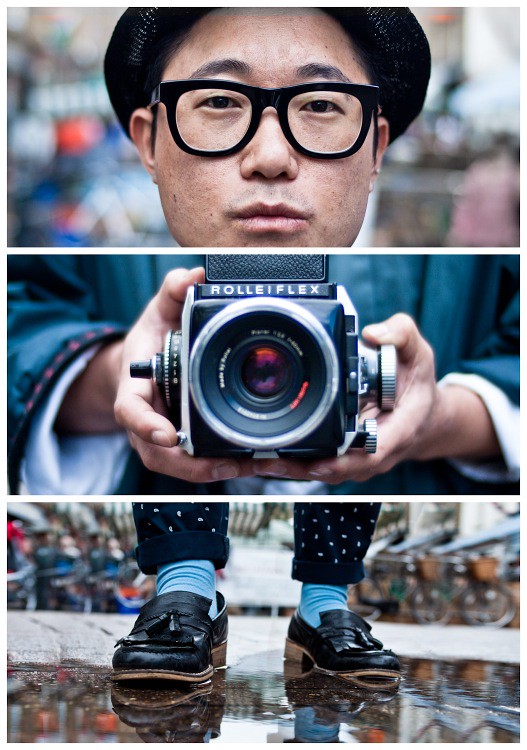
In our first lecture of Creative Media Practice we were introduced to Triptych. Triptych is 3 separate sections that tell separate stories as well as telling a hole story between the 3. Here are some examples that Mark gave us for inspiration... 


We were then given me the task to create our own triptych video. As we had to create our own triptych video, my group began looking at some triptych work on the internet. We searched 'Triptych' on Google and found a few useful website such as...


This certain picture gave us an idea for our own piece.
photo
We decided to have 3 different people make the same journey but only show either their head, shoulders to hips or legs similar to the picture above. We began with Ceri's head on the top, Sonals top half of her body in the middle and my legs at the bottom on the screen. This then changed when we got to the lift where this then changed to my head on the top, the middle of Ceris body and Sonals legs at the bottom on the screen. This then changed when we all went through a door to Sonals head at the top, the middle of my body and Ceris legs on screen.

Here is a link to the final piece we created...